Remote and Online Physical Chemistry Laboratories developed by Professor Jeffery L. Yarger.
Project 1 – Properties of Gases
- Overview – Project 1 Handout – Professor Yarger.
- Prof. Yarger CHM343 Videos – Vimeo CHM 343 Collection or YouTube – Pchem Lab
Computational Lab
- Gas Phase Thermochemistry Computational Resources for Project 1:
- ASU Molecular Calculator – molecalc (github) – molecalc.cloud
- Speed of Sound and Diffusion ‘Optional’ Simulations for Project 1:
Alternative (Advanced) Computational Resources
- ChemCompute – Computational chemistry software for undergraduate teaching.
- WebMO at ASU (Gaussian through SOL Computer Cluster)
Remote Experimental ‘Cloud’ Lab (and/or DIY lab)
- Pchem Cloud Lab – Remote Access Acoustic Interferometer
- Access will be provided August 20, 2023 (and ending Aug 30, 2023).
- TA and Instructor Zoom Schedule to Assist with Remote Access Experimental Lab (Yarger – Mon/Wed 5-6 pm AZ time, Seyler – , Smith -). Zoom meeting links can be found on the Canvas site.
- Remote Acoustic Interferometer Scheduling – This is done using the AsuChm343 (asuchm343@gmail.com) google calendar. Students can access the asuchm343 google account directly (password is provided to students on Canvas), or students can share their google account email and they will be added to the asuchm343 google calendar and google drive.
- CHM 343 Students – Access information using AnyDesk (The freely available AnyDesk client is available for pc, mac, tablets and smartphones. Download and install this app on the device or computer you intend to use for accessing the remote acoustic interferometer. It is recommended that you have a high speed internet connection and use a large screen device such as a laptop or desktop computer.) is provided in ASU Canvas under Module 1 (Anydesk ID and password to access the remote acoustic interferometer for Fall 2023).
- The secondary or alternative access to the remote Acoustic Interferometer is through NoMachine (an alternative VNC app). This requires being logged into the ASU or MRRC VPN (ASU IP address 129.219.52.73).
- Remote – Acoustic Interferometer – Shared Google Sheet. (ASUCHM343)
Additional Resources
- BioPchem Blog Post on DIY and Remote Access Acoustic Interferometry (Speed of Sound) of Gases (Project 1 – Properties of Gases – Experimental Component)
- Remote – Acoustic Interferometer – Shared Google Sheet. (ASUCHM343 google account)
- The Shared Google Sheet has an info, Schedule, Data on Gases, Example Data Analysis and example stacked plot sheet. The link allows editing, but please only edit the Schedule Sheet to fill in last name to schedule time on the remote system.
- J. Chem. Educ. Primary Journal Reference Material., Determining the Speed of Sound and Heat Capacity Ratios of Gases by Acoustic Interferometry (Supporting Information)
Data & Error Analysis (and Reporting)
- YouTube PchemLab Channel (Several Videos on General Error Analysis, Rubrics and Reports) and ASU Canvas Module 0 provides a lot of Data and Error Analysis Information.
- Canvas – Handouts and Info on Reports, Error Analysis and Data Analysis (Copyrighted material, so only available at ASU Canvas for students enrolled in CHM 343).
- The ASU Online Pchem Lab (CHM 343) GitHub Site has an Acoustic_Interferometer repository with lots of example data and data/error analysis of data in a jupyter notebook (google colab).
- Written Project Report Template – Google Doc – Prof. Yarger.
Project 2 – ThermoChemistry
- Overview – Project 2 Handout – Professor Yarger
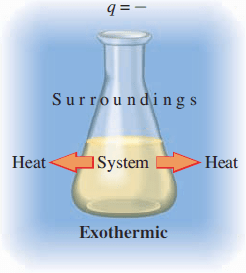
- ASU ONLINE CHM343 Spring 2023 Project 2 students will use benzoic acid as a standard and should pick one fatty acid and one carbohydrate (sugar) for experimental, computational and simulated calorimetry experiments. A understanding of the thermodynamics of simple fats versus carbohydrates is an important and broad reaching health and biochemistry topic.
- Blog Post – Bomb Calorimetry
- Prof. Yarger CHM343 Videos – Vimeo CHM 343 Collection or YouTube – Pchem Lab
Computational Lab
- Computational Resources for Project 2:
- Molecular Calculator – molecalc.cloud
- Computational References and Resources
Alternative (Advanced) Computational Resources
- ChemCompute – Computational chemistry software for undergraduate teaching.
- WebMO at ASU (Gaussian through SOL Computer Cluster)
- Thermochemistry in Gaussian
Remote Experimental Lab
- Bomb Calorimetry – A Simulated Experiment.
- Optional/Additional
- Remote Differential Scanning Calorimeter – Sync Schedule, Fall 2023. (AnyDesk / Zoom)
Data & Error Analysis (and Reporting)
- YouTube PchemLab Channel (Several Videos on General Error Analysis, Rubrics and Reports) and ASU Canvas Module 0 provides a lot of Data and Error Analysis Information.
- Canvas – Handouts and Info on Reports, Error Analysis and Data Analysis (Copyrighted material, so only available at ASU Canvas for students enrolled in CHM 343).
- Written Project Report Template – Google Doc – Prof. Yarger.

Project 3 – Chemical Equilibrium & Kinetics
- Overview – Project 3 Handout – Professor Yarger
Computational
- Computational References and Resources
- Computational Resources for Enol-Keto Molecular Solvation & Equilibrium in Project 3:
- MolCalc – Online Quantum Computational Chemistry (with Polarity and Solvation)
- ChemCompute – Computational chemistry software for undergraduate teaching.
- ORCA – Quantum Computational Chemistry Software – Freely Available (Avogadro GUI)
- Simulating (Predicting) NMR Spectra for Project 3:
- http://www.nmrdb.org/new_predictor/. Online resource for predicting standard 1D and 2D NMR spectra
Remote Experimental Lab
- BioPchem Blog Post on NMR Resources and Useful Links.
- NMR Remote Access Spectrometer (ASU MRRC Bruker 400 MHz NMR)
- AnyDesk ID: mrrc_bruker_400@ad (password provided on Canvas, or email biopchem@gmail.com)
- Instructions for using web-browser for remote NMR access and experiments:
- Connect to the ASU VPN (Cisco AnyConnect SSLVPN – available at myapps.asu.edu)
- In separate Chrome Browser tabs navigate to the following 4 web addresses / links.
- CHM343 NMR Schedule – Fall 2023 – Shared Google Sheet.
- nmrcam1.asu.edu (username: guest password: guest) – Live View NMR Camera.
- http://129.219.52.109:8015 (User ID: chm343) – Bruker Icon Web (Automated NMR in-browser)
- spintropy.com (username: asu_chm343 password: provided to students at ASU-Canvas)
- Icon web is very similar to IconNMR and allows students to remotely submit NMR experiments. Once remote NMR data has been collected, it will be automatically uploaded to spintropy, as long as the correct Spintropy Username is entered (asu_chm343). You can download your data from the asu_chm343 ‘Data’ section (or look at a plot of the data). It is recommended that NMRium be used for NMR data processing and analysis (again, web browser based app).
- NMRium – NMR spectra processing for everybody (excellent in-browser NMR processing).
Data & Error Analysis (and Reporting)
- YouTube PchemLab Channel (Several Videos on General Error Analysis, Rubrics and Reports) and ASU Canvas Module 0 provides a lot of Data and Error Analysis Information.
- Canvas – Handouts and Info on Reports, Error Analysis and Data Analysis (Copyrighted material, so only available at ASU Canvas for students enrolled in CHM 343).
- Written Project Report Template – Google Doc – Prof. Yarger.
 BioPchem